%20(1).png)

.png)
Insightful, formerly known as Workpuls, has emerged as one of the most sophisticated workforce analytics platforms for monitoring remote and hybrid teams. With its comprehensive employee monitoring capabilities including automatic time tracking, screenshot capture, app and website usage monitoring, and behavioral analytics, Insightful presents unique challenges for workers whose legitimate tasks don't align with its activity detection algorithms.
This comprehensive guide explores proven methods for bypassing Insightful's monitoring features while maintaining professional productivity standards. Whether you're dealing with false idle flags during reading-intensive work, low activity scores from phone-based tasks, or simply need more autonomy in structuring your workday, these strategies provide practical solutions specifically designed for Insightful's detection systems.
LazyWork Results
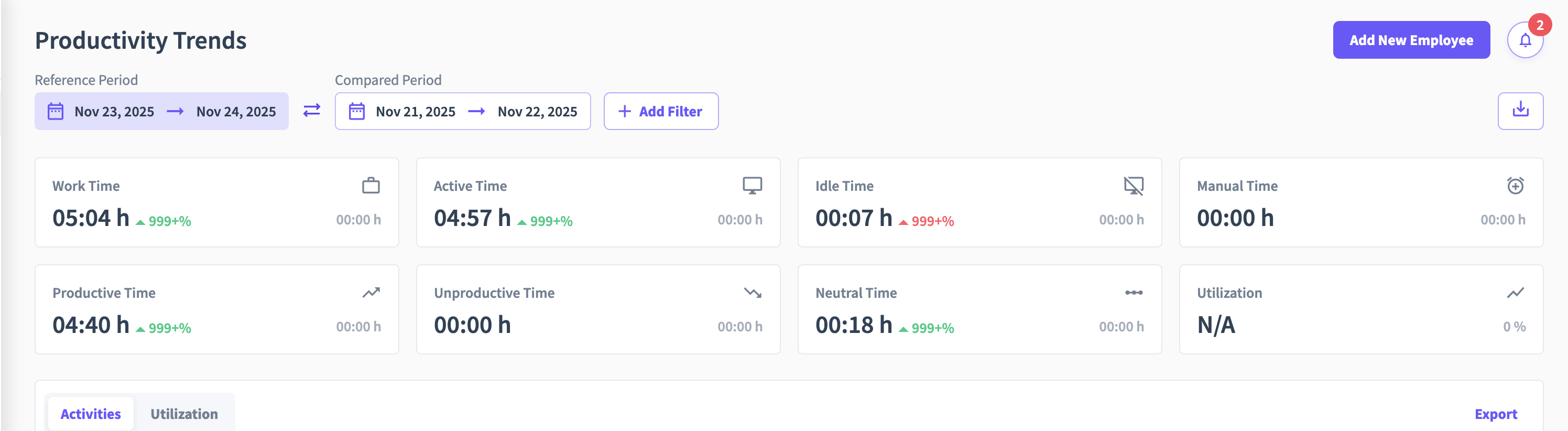
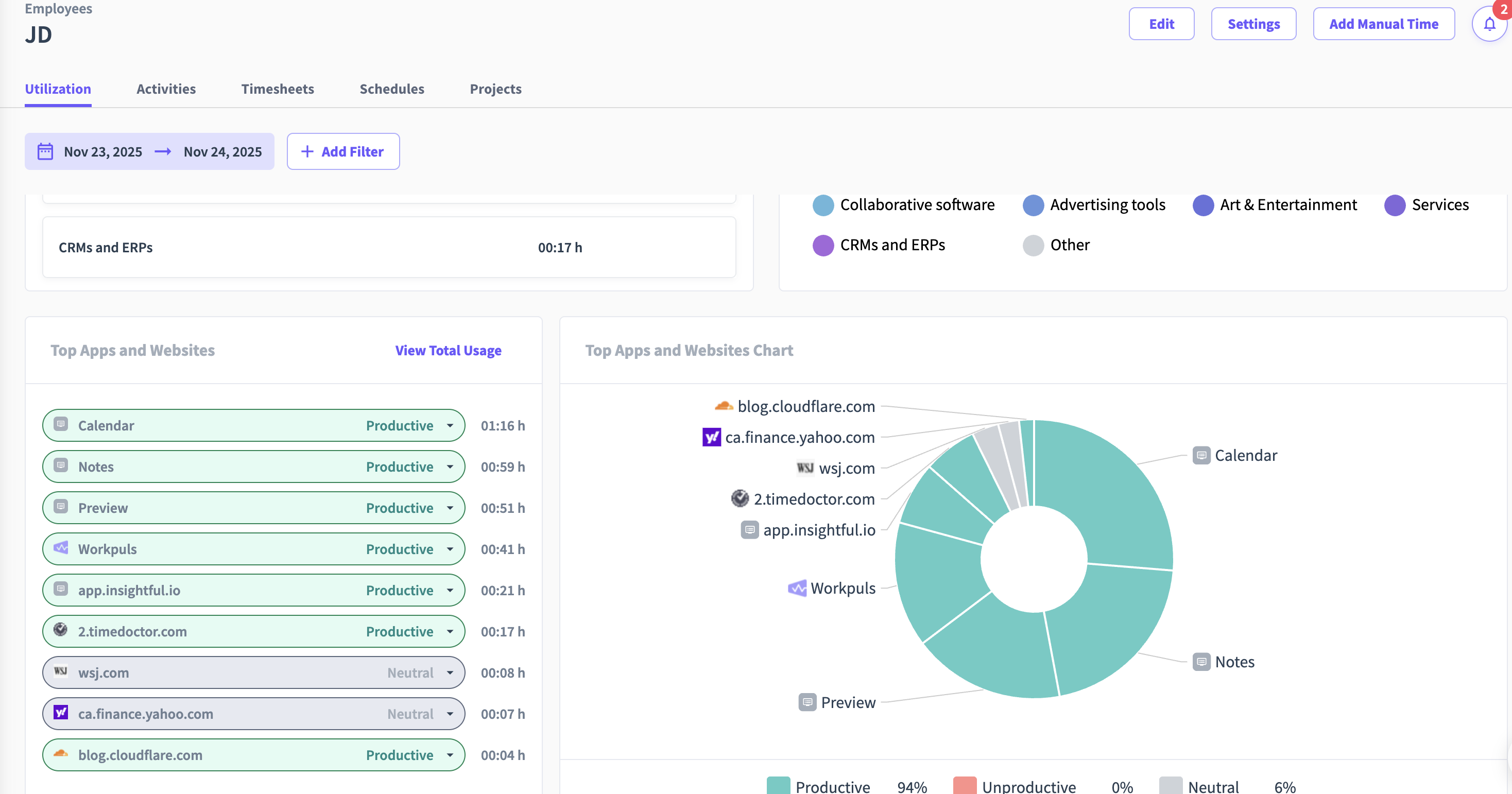
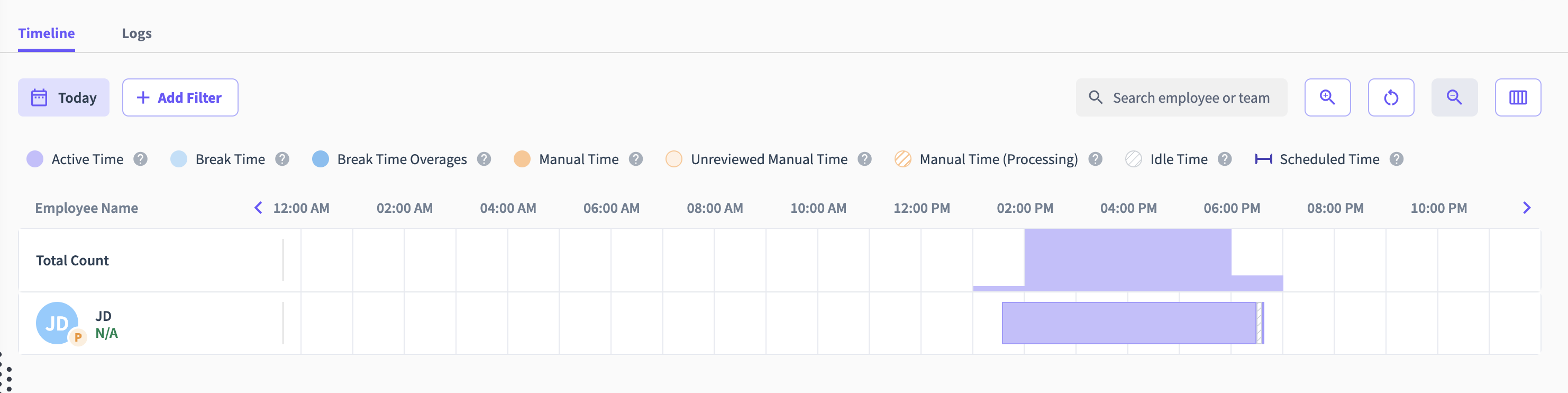
To get this out of the way immediately, take a look at hour Insightful can be bypassed by LazyWork for a typical half day of work. No suspicious activity, undetectable and high quality metrics all with a simple click of a button!
Understanding Insightful Time Tracker Monitoring Capabilities
Insightful represents a significant evolution in employee monitoring technology, particularly since its 2022 rebrand from Workpuls. Understanding the platform's comprehensive monitoring approach is essential for implementing effective bypass strategies.
The platform employs automatic time tracking that runs continuously in the background, capturing every minute of computer activity without requiring manual clock-in or clock-out. This passive monitoring creates a detailed timeline of your entire workday, making it difficult to account for legitimate breaks or non-computer work activities.
Real-time monitoring provides managers with live visibility into employee activities as they occur. Supervisors can view current application usage, active websites, and even real-time productivity scores, creating pressure to maintain constant visible activity throughout work hours.
Screenshot capture functionality remains one of Insightful's most visible monitoring features. The platform takes periodic screenshots at configurable intervals, providing visual evidence of work activities that appears in manager dashboards. Unlike some platforms where screenshots are private, Insightful's visual monitoring creates additional accountability layers.
App and website tracking logs every application you open and website you visit during tracked time. Insightful categorizes these activities as productive, unproductive, or neutral based on administrator-defined settings, directly impacting your productivity scores and potentially affecting compensation or performance reviews.
Behavioral analytics represent Insightful's most sophisticated monitoring capability. The platform employs AI-powered algorithms to analyze patterns in your work behavior, identifying unusual activity, detecting potential security threats, and flagging deviations from your normal work patterns. This advanced analysis makes Insightful particularly challenging to bypass with simple automation tools.
Idle time detection monitors keyboard and mouse activity, flagging periods without input as potentially unproductive. Extended idle time triggers alerts to managers and negatively impacts productivity metrics, even when you're engaged in legitimate work that doesn't require constant computer interaction.
For comprehensive context on Insightful's place in the monitoring software landscape, see our existing guide on bypassing Insightful time tracking.
Why Workers Seek Insightful Bypass Solutions
The need to bypass Insightful monitoring typically stems from legitimate work scenarios rather than attempts to avoid productive work. Understanding these common situations helps frame appropriate and ethical use of bypass strategies.
Many professional tasks involve minimal computer interaction yet represent genuine productivity. Reading and analyzing documents, reviewing client proposals, studying technical specifications, or conducting research all require focus and cognitive engagement without generating measurable keyboard or mouse activity that Insightful recognizes as productive work.
Phone calls and virtual meetings present another common scenario for false idle flags. When participating in client calls, team discussions, or video conferences on platforms other than your monitored computer, Insightful registers no activity even though you're actively working and fully engaged with your professional responsibilities.
Strategic thinking and planning work represents essential cognitive labor that produces no activity metrics. Writers brainstorming content strategies, developers designing system architectures, managers planning team workflows, and consultants analyzing client problems all engage in valuable work that Insightful's activity detection cannot capture.
Learning activities like watching training videos, attending webinars, studying technical documentation, or participating in online courses contribute to professional development but generate minimal trackable activity beyond occasional scrolling or note-taking.
The psychological impact of constant monitoring also drives bypass tool adoption. Surveillance anxiety, pressure to maintain artificially high activity levels, and the erosion of professional autonomy create stress that paradoxically reduces actual productivity despite appearing "active" according to Insightful's metrics.
For professionals working across multiple platforms or managing client relationships that extend beyond computer work, Insightful's monitoring creates particular challenges. Our guide on mouse mover apps for virtual assistants explores these specific scenarios.
Method 1: Strategic Work Pattern Optimization
Understanding how Insightful calculates productivity allows you to structure work patterns for optimal scores without sacrificing genuine productivity or work quality.
Insightful measures activity through multiple metrics simultaneously—keyboard strokes, mouse movements, application switches, and screen changes. Creating varied activity across all these dimensions proves more effective than high activity in just one area.
Balance different task types throughout your day to create natural activity variation. After spending 20-30 minutes on reading-intensive or analytical work that generates low activity, transition to tasks requiring typing or clicking. This alternation maintains reasonable overall activity levels while accommodating diverse work requirements.
Cluster genuinely high-activity tasks during peak monitoring periods. If your manager primarily reviews morning productivity reports, schedule email responses, documentation updates, data entry, or other keyboard-intensive tasks during those hours. Reserve afternoon time for reading, planning, or phone work that benefits from supplemental activity tools.
Use Insightful's detailed activity breakdowns strategically. Review your weekly productivity reports to identify patterns in your activity scores. Understanding which tasks generate higher Insightful scores helps you structure your day to balance naturally low-activity and high-activity work effectively.
Maintain periodic genuine interaction during low-activity tasks. Scrolling documents, switching between reference materials, or taking brief notes generates legitimate activity signals while supporting actual work quality and comprehension.
However, manually maintaining activity throughout extended focus sessions or during phone-heavy work days proves tedious and unsustainable. For more reliable solutions that don't require constant attention, automated approaches provide more effective strategies.
Method 2: Application and Website Management
The applications and websites you use during tracked time significantly impact your Insightful productivity scores and overall monitoring profile.
Verify which applications and websites your organization classifies as productive versus unproductive. Insightful allows administrators to customize these categorizations, so understanding your specific organizational settings helps you prioritize work within applications that benefit your productivity scores.
When multiple tools can accomplish the same task, choose options classified as productive in your Insightful configuration. For research-intensive roles, understand which websites and resources your platform considers work-related versus general browsing to optimize your activity reports.
Keep work-focused content visible on your screen, especially given Insightful's screenshot monitoring capabilities. Clean, organized workspaces with relevant materials demonstrate professionalism in visual monitoring while supporting actual productivity.
Close unnecessary applications and browser tabs during tracked time. Cluttered desktops with dozens of open programs create unfavorable impressions in application tracking reports and may trigger Insightful's behavioral analysis algorithms if patterns seem suspicious.
For roles requiring extensive web research, maintain organized bookmarks and browser tabs that demonstrate work focus. Even if browsing patterns appear similar in activity metrics, visual evidence of professional research differs significantly from random web surfing in manager reviews.
Strategic use of Insightful's categorization system can help justify varied activity patterns. When working on tasks that naturally generate lower activity, ensure supporting applications and websites clearly relate to your assigned projects and responsibilities.
Method 3: Comprehensive Activity Simulation with LazyWork
For reliable Insightful bypass that works across all monitoring features, comprehensive activity simulation provides the most effective solution.
LazyWork offers purpose-built features specifically designed and tested for Insightful's sophisticated detection algorithms. Unlike basic mouse movers that create obvious repetitive patterns, LazyWork generates randomized mouse movements, realistic keyboard input, automatic application switching, intelligent scrolling, and browser tab changes—creating comprehensive activity signals that Insightful recognizes as legitimate work.
The software operates in complete stealth mode, remaining invisible to Insightful's application tracking and process monitoring. This discretion is crucial, as workers have been flagged for using obvious automation tools that appear in their tracked application lists or trigger Insightful's behavioral analysis systems.
LazyWork addresses Insightful's screenshot monitoring through intelligent behavior. The application switches between browser tabs and applications automatically, ensuring each screenshot captures different content. Automatic scrolling creates visible movement in screenshots, demonstrating active engagement rather than static viewing.
Activity randomization proves essential for bypassing Insightful's advanced behavioral analytics. LazyWork varies the timing, intensity, and type of simulated actions, creating patterns that mirror natural human behavior rather than mechanical repetition. This randomization prevents triggering Insightful's AI-powered unusual activity detection.
Insightful-specific optimization ensures compatibility with the platform's unique monitoring approach. LazyWork has been tested extensively with Insightful's latest versions, with configurations tailored to the platform's specific detection algorithms and behavioral analysis systems.
Setting up LazyWork for Insightful requires minimal configuration but strategic adjustment. Download the software from the LazyWork website, install it on your system, and configure settings according to our comprehensive starter guide.
Key configuration recommendations for Insightful include setting random intervals between 30-90 seconds to create natural activity patterns, enabling all activity types for comprehensive simulation that addresses Insightful's multi-metric monitoring, configuring stealth mode to hide from process lists and application tracking, enabling application switching and browser tab changes to create varied screenshots, and scheduling operation only during actual work hours to maintain realistic activity timestamps.
For professionals who also face other monitoring systems alongside Insightful, comprehensive solutions address multiple requirements simultaneously. Our guide on bypassing activity tracking software details how activity simulation maintains compliance across different monitoring platforms.
Method 4: Screenshot Monitoring Management
Insightful's screenshot capture feature presents unique challenges requiring specific strategies beyond basic activity generation.
Ensure work-related content remains visible on your primary monitor. If using multiple screens, keep Insightful-tracked work on the monitor that screenshots capture. This prevents screenshots showing personal or non-work content that could raise questions during manager reviews.
Understand Insightful's screenshot frequency and timing. If your organization configures screenshots every 5 or 10 minutes, structure your screen content accordingly. While you can't predict exact screenshot timing, maintaining professional screen content consistently reduces risk.
When using activity simulation tools, verify they create natural variation in screenshots. LazyWork's application switching and scrolling features ensure each screenshot shows different content and screen positions, appearing as if you're actively working through various tasks rather than viewing static content.
Close unnecessary applications and organize your desktop professionally. Screenshots showing focused work appear more credible than cluttered screens with personal content or excessive open applications unrelated to your assigned tasks.
For roles involving confidential client information or sensitive data, understand Insightful's screenshot security features and privacy settings. The platform offers options for blurring certain screen regions or limiting screenshot access, allowing you to protect private information while maintaining activity monitoring.
Maintain genuine work-related content alongside activity simulation. While LazyWork handles activity generation, having actual work materials visible—documents, spreadsheets, relevant websites—creates authentic screenshots that support your productivity narrative.
Method 5: Leveraging Insightful's Built-In Features
Insightful includes several features that, when used strategically, help manage monitoring concerns without requiring external tools.
Project and task categorization allows you to provide context for varied activity levels. When activity naturally runs lower during planning or review tasks, appropriate task labeling explains the pattern to managers reviewing reports.
Time tracking transparency features let you add notes or context to specific time periods. If you experience legitimate technical issues, attend meetings on other platforms, or engage in phone-based work, documenting these activities provides context for lower Insightful-recorded activity.
Privacy mode options, where available, allow temporary monitoring pauses during breaks or personal time. However, verify your organization's policies around privacy mode usage, as some companies restrict or monitor these features.
Mobile app considerations affect monitoring for some Insightful implementations. If your role involves mobile work, understand how Insightful handles mobile versus desktop activity to structure your work appropriately across devices.
Communication with management about work patterns can sometimes address monitoring concerns more effectively than technical solutions. For roles involving significant phone work, client meetings, or strategic planning, discussing these responsibilities upfront sets appropriate expectations about activity patterns.
However, not all organizational cultures support open discussions about monitoring, and genuine technical solutions often provide more reliable and sustainable approaches to maintaining accurate activity records during legitimate work.
Dealing with Insightful's Behavioral Analytics
Insightful's AI-powered behavioral analytics represent its most sophisticated defense against bypass attempts, requiring specific strategies to avoid detection.
The platform's unusual activity detection analyzes patterns over time, identifying deviations from your established work habits. Sudden dramatic changes in activity patterns, perfectly consistent activity levels, or mechanical timing intervals trigger algorithmic flags for manager review.
Start activity simulation gradually rather than implementing it suddenly at maximum intensity. If you've historically shown variable activity patterns, implementing LazyWork should maintain similar variability rather than creating unnaturally consistent high activity that differs dramatically from your baseline.
Maintain realistic activity levels rather than aiming for perfect scores. While basic mouse jigglers often create 100% activity rates that appear suspicious, LazyWork's configurable intensity allows you to target 85-95% activity that appears more natural and sustainable.
Combine automated activity with genuine periodic interaction throughout your workday. This combination creates the most realistic and sustainable pattern while allowing focus on actual productive tasks rather than constant manual activity generation.
Avoid using multiple bypass tools simultaneously unless specifically designed to work together. Running several automation tools creates conflicting activity patterns that Insightful's behavioral analysis may flag as suspicious or unusual.
For context on how modern monitoring systems detect and respond to bypass attempts, see our analysis of the mouse jiggler dilemma which explores why sophisticated solutions have become necessary.
Combining Multiple Bypass Methods
The most effective Insightful bypass strategy combines several approaches tailored to your specific work situation and monitoring configuration.
Start with work pattern optimization—structure your day to balance naturally high-activity and low-activity tasks, maintaining reasonable baseline activity without complete reliance on automation.
Layer on application management—work primarily in productive applications and maintain professional browsing patterns to create favorable activity reports and clean screenshots that support your productivity narrative.
Implement comprehensive activity simulation using LazyWork for reliable, consistent activity maintenance that addresses all Insightful monitoring layers simultaneously. Configure the software according to platform-specific recommendations for your exact Insightful setup.
Supplement automation with genuine periodic activity during naturally low-activity work. This combination creates the most realistic and sustainable pattern while allowing focus on actual productive tasks.
Use Insightful's built-in features appropriately when available—categorize tasks accurately, add context notes when helpful, and maintain transparent communication with management about work patterns when organizational culture supports it.
Regularly review your Insightful activity reports to ensure your approach remains effective. Adjust configurations or work patterns if you notice concerning trends before they trigger manager intervention or behavioral analysis flags.
Platform-Specific Considerations for Insightful
Insightful offers different implementation options and features that may require adjusted bypass strategies depending on your specific deployment.
Cloud-based versus on-premise installations may have different monitoring capabilities or privacy settings. Understand your organization's specific Insightful implementation to tailor your approach appropriately.
Industry-specific configurations affect how Insightful categorizes activities. Healthcare, finance, and other regulated industries may implement stricter monitoring or additional compliance features that require specific bypass considerations.
Integration with other tools affects overall monitoring. If Insightful integrates with your project management software, communication platforms, or other business tools, understand how these integrations affect activity tracking and reporting.
Administrative settings vary by organization. Some companies implement Insightful with minimal monitoring, using only basic time tracking, while others enable comprehensive surveillance including behavioral analytics and real-time alerts.
For professionals working with multiple monitoring systems beyond Insightful, comprehensive solutions prove most efficient. Our guide on bypassing time tracking software explores strategies for managing multiple monitoring platforms simultaneously.
Handling Insightful Updates and Detection Changes
Insightful continuously evolves its monitoring capabilities and behavioral analytics to identify automation and bypass attempts. Staying ahead of these changes requires awareness and adaptation.
Monitor Insightful's update announcements and feature releases for new monitoring capabilities. The platform occasionally introduces features specifically designed to detect automation patterns or unusual activity, particularly in response to growing bypass tool usage.
LazyWork maintains ongoing compatibility with Insightful through regular updates. The development team actively tests against Insightful's latest versions and adjusts algorithms to maintain undetectability as the platform evolves.
Our LazyWork testing update provides current information about compatibility with major monitoring platforms, confirming that LazyWork remains undetected across Insightful's latest releases.
If you notice sudden changes in your activity scores, receive questions about work patterns, or observe new monitoring features in your Insightful interface, this may indicate the platform has implemented new detection capabilities. Contact LazyWork support for configuration adjustments or review updated platform-specific guides.
Building genuine productivity habits alongside bypass tools creates resilience against detection changes. Consistent deliverables, quality output, and strong performance reviews matter more than perfect activity scores in long-term career success.
Ethical Considerations and Responsible Use
While bypassing Insightful monitoring is often necessary to prevent false idle flags during legitimate work, responsible use requires ethical boundaries and professional judgment.
Activity simulation should supplement genuine productivity, not replace it. Using these tools to appear active while completely absent or unavailable represents time theft regardless of technical sophistication. The appropriate use case involves preventing false idle detection during real work activities that don't generate measurable activity—reading, phone calls, strategic planning, or analytical thinking.
Maintain consistent quality output and meet all deadlines regardless of activity scores. If your deliverables consistently meet or exceed expectations, activity metrics become secondary to overall performance evaluation.
Consider discussing monitoring concerns directly with management when possible and appropriate. Many organizations prove flexible and understanding about different work styles when approached professionally with demonstrated track records of strong performance.
Use bypass tools only during genuine work hours and in support of actual productivity. Configure scheduling features to prevent 24/7 operation that might create unrealistic activity patterns and raise suspicion.
Understand your employment agreement and organization's acceptable use policies regarding monitoring and activity simulation. While preventing false idle flags during legitimate work is generally reasonable, review your specific contractual obligations.
For broader perspective on monitoring ethics and workplace surveillance trends, see our article on hacking time management which explores the balance between productivity measurement and professional autonomy.
Troubleshooting Common Insightful Bypass Issues
Even with proper configuration, you may encounter challenges when implementing Insightful bypass strategies. Here are solutions to common problems.
If activity scores remain low despite using simulation tools, verify the software has necessary system permissions. On Mac, check System Preferences under Security & Privacy for accessibility permissions. On Windows, ensure antivirus software isn't blocking the application or flagging it as suspicious.
When screenshots show static content despite activity simulation, confirm that application switching and scrolling features are enabled and functioning correctly. LazyWork's demo mode allows visual verification of all features before relying on them during tracked work.
If Insightful flags unusually high or consistent activity as suspicious through its behavioral analytics, reduce intensity or frequency of simulated actions. Aim for realistic 85-95% activity rather than perfect 100% scores that may appear artificial.
For situations where certain applications consistently generate low activity despite bypass tools, verify Insightful can detect activity in those applications. Some secure or specialized software may isolate from system-level activity monitoring.
When managers question activity patterns, focus conversations on deliverables and output rather than defending activity scores directly. Strong work product provides the best support for any metrics questions and demonstrates genuine productivity regardless of activity patterns.
If bypass tools suddenly stop working after an Insightful update, check for software updates from your tool provider and review updated configuration guides for your specific monitoring platform version.
Long-Term Success With Insightful Monitoring
Sustainable Insightful bypass requires balancing monitoring compliance with genuine productivity and professional development for long-term career success.
Focus primarily on delivering excellent work. Consistently meeting deadlines, producing quality output, and exceeding expectations builds trust that reduces scrutiny of activity metrics over time.
Build strong working relationships with managers and colleagues. Regular communication, proactive updates, and collaborative problem-solving create trust that makes activity scores less critical to your professional reputation.
Develop efficiency in core work tasks so you can maintain strong deliverables while having more flexibility in structuring your time and managing activity expectations without sacrificing output quality.
Stay informed about evolving workplace norms around monitoring and privacy. As remote work matures, many organizations are reducing invasive monitoring in favor of outcome-based evaluation and trust-based relationships.
Maintain professional development and skill growth regardless of monitoring systems. Investing in your capabilities creates long-term career opportunities that may offer more favorable work arrangements or organizational cultures that better align with your work style preferences.
Consider long-term career moves that align with your preferences around monitoring and autonomy. If Insightful's extensive surveillance creates persistent stress or conflicts with your optimal productivity patterns, seeking positions with different evaluation approaches may improve both satisfaction and performance.
For professionals managing various remote work challenges beyond just activity tracking, our guide on remote work productivity tools provides comprehensive recommendations for building an effective technology stack.
Related Resources:
- How to Bypass Insightful: Ultimate Guide
- 3 Ways to Bypass Time Tracking Software
- LazyWork Starter Guide
- Mouse Mover Apps for Virtual Assistants
- LazyWork Testing Update
Ready to bypass Insightful monitoring while maintaining genuine productivity? Try LazyWork free for 7 days and experience undetectable activity simulation specifically optimized for Insightful's sophisticated detection algorithms.