.png)

Undetectable Time Tracking Bypass Software: LazyWork Performance Results for 2026
As remote work monitoring continues to advance in 2026, employee time tracking software like Time Doctor and Hubstaff has become increasingly sophisticated. Many remote professionals and freelancers search for ways to maintain work-life balance while dealing with intrusive productivity monitoring tools.
LazyWork has emerged as the leading solution for simulating authentic user activity while remaining completely undetectable by modern time tracking systems.
January 2026 Detection Testing Results
Our comprehensive testing conducted in early 2026 confirms that LazyWork continues bypassing detection algorithms used by industry-leading time trackers including Hubstaff, Time Doctor, and similar monitoring platforms. Below are our verified results from a 2-hour monitored work session using LazyWork's "High Activity" configuration preset.
Testing Environment:
- LazyWork Version: 3.0
- Time Tracking Software: Hubstaff Pro 2.8, Time Doctor 3.5
- Test Duration: 2 hours continuous monitoring
- Activity Preset: High intensity simulation
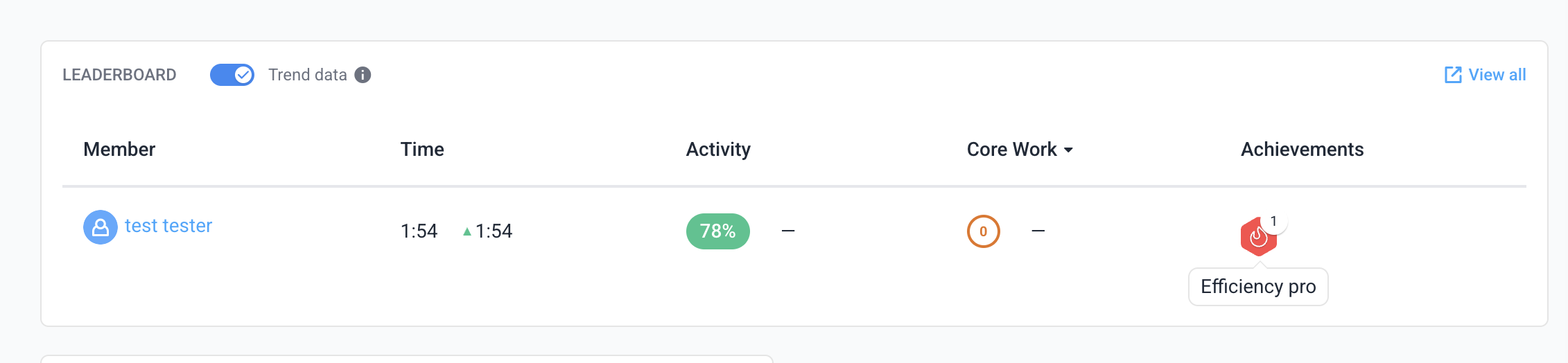

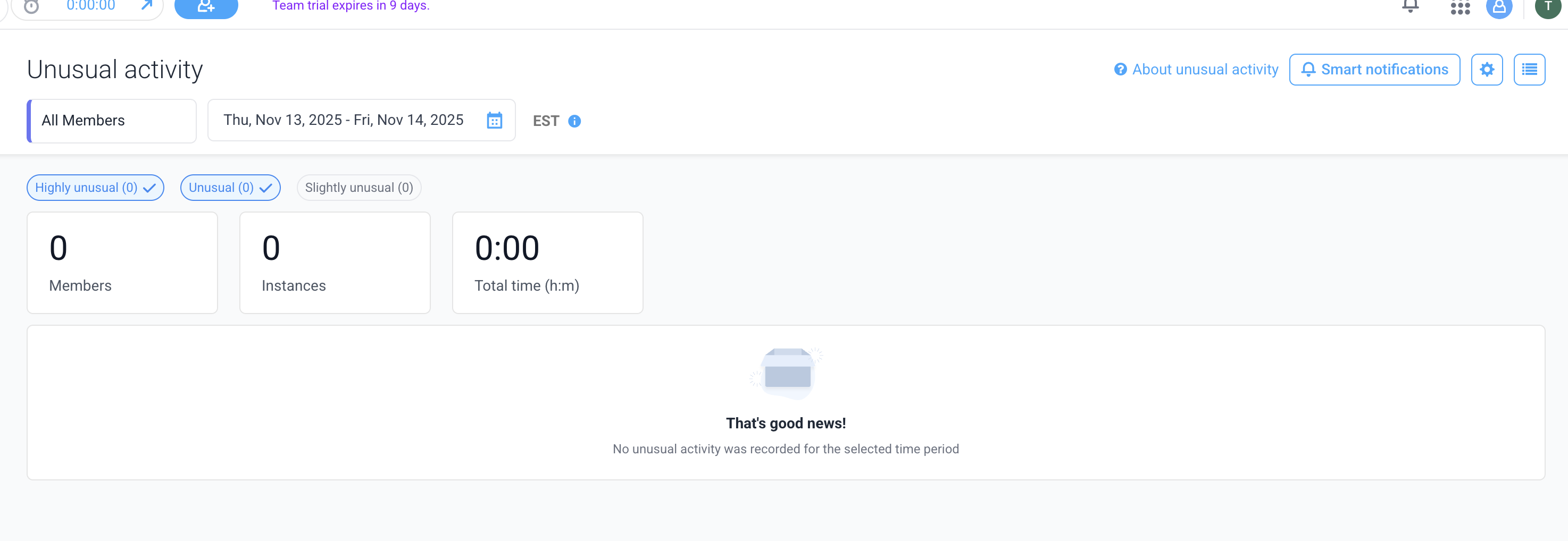
How We Test Time Tracking Bypass Tools in 2026
Our testing methodology for undetectable time tracking software involves:
Real-World Scenario Testing – Running LazyWork alongside active Hubstaff and Time Doctor monitoring for extended periods (2-8 hours)
Multi-Intensity Analysis – Testing low, medium, and high activity simulation settings to verify natural behavior patterns
Detection Algorithm Monitoring – Analyzing whether time tracking software flags any unusual patterns, keyboard/mouse anomalies, or suspicious application behavior
Screenshot Verification – Ensuring captured screenshots appear authentic without revealing automation software
Idle Time Prevention – Confirming zero idle time warnings or productivity drops during simulation
Essential Features of LazyWork for Bypassing Time Doctor and Hubstaff in 2026
LazyWork includes advanced capabilities specifically designed to evade modern detection systems used by employee monitoring software:
Intelligent Mouse Movement Simulation – Generates authentic, randomized cursor paths with realistic acceleration and deceleration patterns that perfectly mimic human behavior to avoid idle detection algorithms
Natural Keyboard Activity Patterns – Creates variable typing rhythms with realistic pauses, speed fluctuations, and natural error corrections that prevent time tracking software from detecting automation
Smart Application Switching – Automatically alternates between active applications, browser tabs, and programs with human-like timing intervals to create believable multitasking patterns
Authentic Scrolling Behavior – Simulates organic scrolling movements with variable speeds, directional changes, and pause patterns that enhance credibility during screenshot monitoring
Customizable Activity Profiles – Offers granular control over simulation intensity, frequency, and patterns to match your specific work style and avoid detection
AI-Powered Randomization – Employs machine learning algorithms to ensure no repetitive patterns that could trigger advanced detection systems in 2026
All features are fully customizable and designed to adapt to your unique workflow, ensuring simulated activities remain completely authentic and undetectable.
Privacy and Security: Client-Side Time Tracking Bypass
Critical Privacy Features:
100% Local Processing – LazyWork operates entirely on your device with zero cloud connectivity
No Data Transmission – Absolutely nothing is uploaded to external servers or third parties
Complete Anonymity – No registration, tracking, or telemetry of any kind
Encrypted Configuration – All settings stored locally with encryption
Open Architecture – Transparent operation that respects user privacy
This client-side architecture ensures maximum security and privacy while bypassing time tracking software.
⚖️ Understanding the Ethics of Time Tracking Bypass Software
Before using any tool to circumvent employee monitoring systems, it's essential to understand the broader implications:
Why Employers Use Time Tracking Software:📌 Measuring productivity and output in remote environments
📌 Ensuring accountability for billable hours
📌 Identifying workflow bottlenecks and optimization opportunities
📌 Maintaining compliance with client contracts and SLAs
Considerations When Using Bypass Tools:📌 Using activity simulation without disclosure may violate employment agreements
📌 Trust erosion can have long-term career consequences
📌 Some jurisdictions have specific regulations about time fraud
📌 Consider whether the real issue is unreasonable monitoring policies
Legitimate Use Cases:✅ Preventing idle status during active thinking/planning work
✅ Maintaining activity during legitimate breaks with system access
✅ Testing monitoring software capabilities (with authorization)
✅ Personal devices with invasive employer software
💡 Best Practices for Using Time Tracking Bypass Tools Responsibly
Recommended Approach:
- Evaluate Your Situation – Determine if the monitoring is genuinely unreasonable or if there are legitimate productivity concerns
- Consider Open Communication – Discuss monitoring concerns with management when possible
- Use Strategically – Apply bypass tools only when genuine work is happening but systems fail to recognize it
- Maintain Actual Productivity – Remember that bypassing tracking doesn't replace actual work output
- Understand Your Rights – Research employee privacy laws in your jurisdiction
- Document Your Work – Keep independent records of actual work completed
📊 How Time Tracking Software Detects Automated Activity (And How LazyWork Evades It)
Common Detection Methods Used by Hubstaff and Time Doctor:
Pattern Recognition – Identifying repetitive mouse movements or keyboard intervals
→ LazyWork Solution: Advanced randomization algorithms with chaos theory implementation
Screenshot Analysis – Detecting automation software in captured images
→ LazyWork Solution: Stealth mode with zero visible interface elements
Application Monitoring – Flagging known automation or macro software
→ LazyWork Solution: Proprietary process naming and memory signature masking
Statistical Anomalies – Identifying unnaturally consistent activity levels
→ LazyWork Solution: Variable intensity profiles mimicking natural work rhythms
Timing Analysis – Detecting perfect intervals between actions
→ LazyWork Solution: Biometric-inspired timing variations based on human behavior studies
LazyWork 2026: The Ultimate Solution for Time Doctor and Hubstaff Bypass
Based on extensive testing throughout early 2026, LazyWork remains completely undetectable by leading employee monitoring platforms including Time Doctor, Hubstaff, ActivTrak, Teramind, and similar solutions.
Key Advantages:
✨ Proven Track Record – Successfully tested against all major time tracking platforms
✨ Regular Updates – Continuous development to stay ahead of detection algorithms
✨ Natural Behavior – Sophisticated simulation that perfectly mimics human interaction patterns
✨ Privacy First – Complete local operation with zero data collection
✨ Easy Setup – Simple configuration with preset profiles for different use cases
✨ Customization – Granular control over every aspect of activity simulation
The arms race between monitoring tools and privacy solutions like LazyWork will likely continue, making it crucial to stay informed about both technological capabilities and your rights as an employee.
Undetectable Time Tracking Solutions for 2026
LazyWork has conclusively demonstrated its ability to remain undetected by sophisticated monitoring systems including Time Doctor and Hubstaff throughout extensive testing in 2026. The software provides remote workers, freelancers, and employees with greater autonomy over their activity reporting while maintaining natural, authentic-looking behavior patterns.
However, responsible use is paramount—always weigh the ethical considerations, contractual obligations, and potential consequences before implementing any time tracking bypass solution.